How to Add the vehicle
- login
- eWay Menu
- vehicle sub Menu
- +Add vehicle
eWay could refers the platform which helps in adding the vehicle and managing vehicle registration.
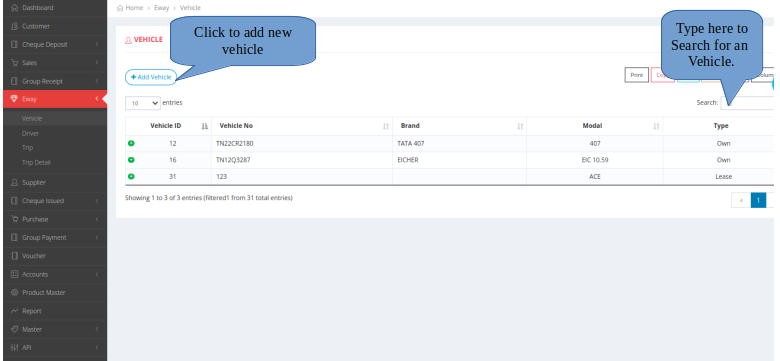
Image and Text representation to Add an vehicle
Adding the vehicle
This will help you to add the new vehicle.

×

×
- Login to equalside.in
- Enter all the necessary details.
- The * fields are mandatory.
- Click submit button after filling all the details.
Action icons in vehicle menu
Action Icons
vehicle menu is also faciliated to view, edit and delete the vehicle information.
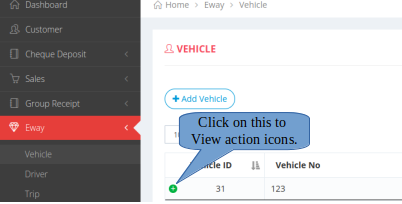
Action icon representation
- eWay
- vehicle
- green colour + icon
How to perform Add, Edit and delete the vehicle
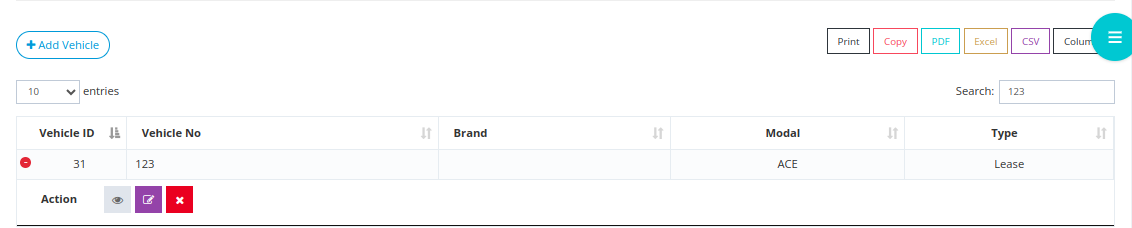
- Click on the eye icon to view the particular vehicle details.
- Click on the pencil icon to edit the vehicle details.
- Click on the X icon to delete the vehicle details.