Sales Order
- Home
- sales
- sales order
A sales order is a document generated by a seller confirming the sale of goods or services to a buyer.
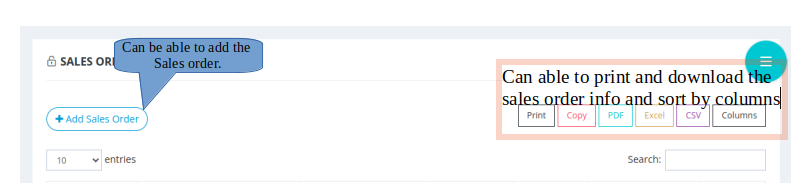
- PROCEDURES TO BE FOLLOWED TO CREATE AN SALES ORDER

×
- click on the sales order.
- Fill all the required fields.

×
- Click on the create sales order button.
- The sales order will be created.
- ICON DESCRIPTION

×
- 1.viewing the sales order document.
- Click on to the icon number 1 and you can able to view the sales order of the particular person.

×
- 2.Add the sales order document
- Click on the icon number 2

×
- Choose the file that you want to add.
- Click the generate button.

×
- 3. Converting sale order.
- Click on the icon number 3 to convert the sale order.

×
- Click on the convert sale order to convert.

×
- 4. Cancel the balance.
- Click on the icon number 4 to cancel the balance.

×
- Click on the cancel Balance icon.
- The balance will get cancelled.

×
- 5. Editing the sales order.
- Click on the icon number 5 and edit the sales order .

×
- 6. Editing the sales order.
- Click on the icon number 6 to cancel the sales order.

×